Product
One game. Every screen it takes to run it.
What guests see on their phones, what your staff use on the night, and what you set up beforehand. All of it in the browser.
How it works
Wave. Connect. Collect.
Wave
A guest joins with a photo, a first name and a pickup line, then waves at anyone they'd like to meet. A wave can be taken back within a minute.
Connect
A wave returned is an instant match. Both guests get directions to the prize, a pickup clock and a private chat.
Collect
At the bar they show a QR code or four digits. Staff confirm both faces and mark the prize collected.
Guest experience
Thirty seconds to join. Nothing to install.
- Three ways in: a QR sign at your venue, a link on the guest's e-ticket after the door scan, or a link in a text.
- A profile in a few taps: up to three photos, a first name and a pickup line. Stuck for one? Wave suggests from hundreds.
- Filters for who they'd like to see, and lists for matches, waves sent and waves received.
- Thumbs down hides someone for good, in both directions.
- Never an empty room: until enough guests have joined, Wave shows clearly labelled sample profiles and texts guests when the room fills.
- Capacity built in: set a cap, and Wave keeps a waiting list and invites the next guests in when there's space.
- Their data, their call: guests can delete their profile at any time.
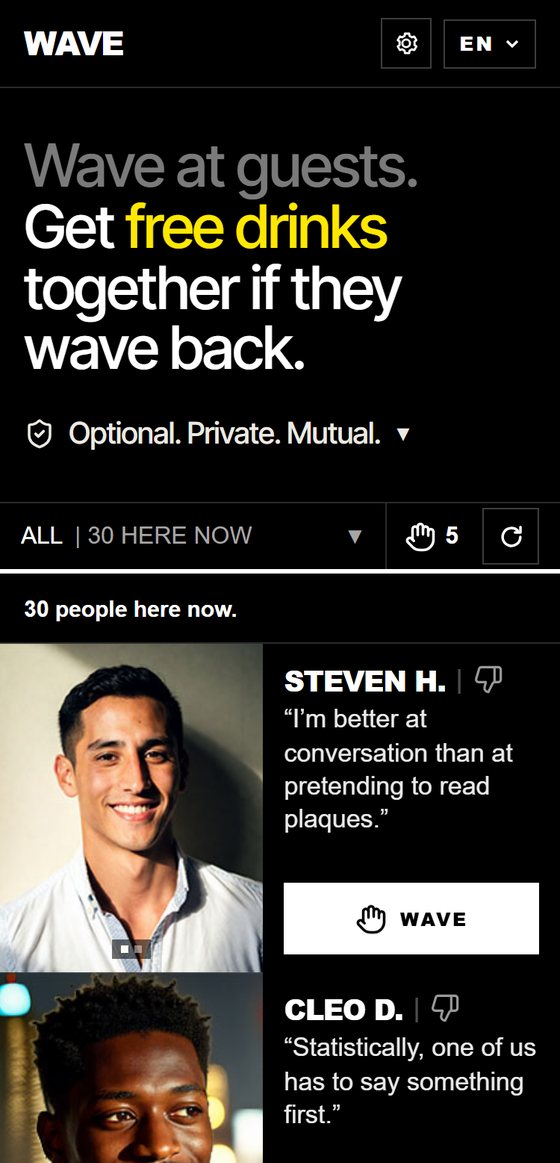
Sample profiles.
The match
Both guests see who, where and how long they have. While matched they can message each other; the chat closes when they collect.
The pickup clock
A match has a window to collect, 60 minutes by default, with a grace period and a last-pickup time you set.
One match at a time
The default, so nobody collects prizes like trophies. Waves received meanwhile wait their turn.
Backup prizes
When stock runs low you're warned. When it runs out, a backup prize takes over, or guests can meet anyway.
Notifications
Guests who turn on alerts hear about waves and matches by text or email. Waves are batched, and every message is discreet.
Seven languages
English, Spanish, French, German, Italian, Portuguese and Chinese. Guests' own words are translated too.
Staff tools
Three roles, three screens, no passwords.
Staff sign in with a link sent by email. Each sees only what their job needs.
Bar staff
Scan the code or type four digits. "Are these the two people in front of you?" An ID check appears only when the prize is alcohol. Then Mark collected.
Manager
Runs one night: the live room, tonight's numbers, reports to review with faces, and holds. One switch for Normal, a smaller room, or Off.
Admin
Everything: events, setup, staff, the blocklist, the copy guests read, and an audit log of every change.
Practice mode
Every event can run as a practice first, every screen marked as such, so your team learns the night before guests arrive.
Separate switches
Texts and prize collection each have their own off switch, so one problem never takes the whole night down.
Setup
From a name to live in eleven steps.
A guided setup that won't let an event go live until it's ready. Copy last month's event and change only what's new.
Your words
Every line guests read is editable: the headline, the prize, where to collect it, even what Wave says when it's off.
Your look
Your name or logo in the header, and your own image on the opening screen.
Your prize
Drinks, a gift, a print, a discount. Alcohol turns on the ID check at the bar automatically.
Your hours
Dates, days of the week and opening hours. Wave opens and closes itself.
Your limits
Waves per hour, open matches, the room's minimum size and the visit length, all with sensible defaults.
Many events
Each event has its own link and its own room. Draft, live and archived, with copy-from.
Reports
Know what your night did.
- A live dashboard: joins, waves, matches, prizes claimed and collected.
- A night report in fifteen-minute steps, so you see when the room peaked.
- A daily email with the numbers, and a spreadsheet export for anything else.
- Delivery health for texts, with alerts if messages start failing.
Illustration. Figures are examples.
Integrations
Fits the systems you already run.
Ticketing
Wave can open from your e-ticket after the door scan, knowing the guest's visit, and keeping guests from the same order apart.
Text and email
Messages go out from your sender name. Opt-outs are honoured automatically, and delivery is monitored.
Cloud hosted
Hosted on Microsoft Azure, with separate practice and live environments. Nothing to install on your network.
Using a ticketing system we don't connect to yet? Tell us which one.
See it on your own phone.
We'll walk you through a live demo and set up a practice event for your team.